Using TpServer Nodes
This document introduces the TpServer node functionality in SynxDB Cloud, helping you understand its core concepts, use cases, and usage methods.
Note
In the current version, TpServer is an experimental feature. It is deeply involved in the system’s metadata management, and its stability is critical to the normal operation of multiple core services. Please use with caution.
Note
TpServer relies on UnionStore for its underlying storage. You must enable both enable-tp-server and enable-union-store in the deployment configuration; otherwise, TpServer cannot be created. This requirement is independent of the account’s metadata backend — accounts using either UnionStore or FoundationDB as their metadata type can host TpServer nodes, as long as UnionStore is enabled at the deployment level. For details, see Deploy SynxDB Cloud.
TpServer nodes are stateful compute nodes in SynxDB Cloud clusters. They are specifically designed to efficiently handle streaming data and TP (transactional processing) workloads, and support using standard Heap tables for storage in these scenarios.
In the overall architecture, TpServer nodes are vertically separated from traditional stateless Warehouse Segment nodes used for analytical queries. This design isolates transactional workloads from analytical workloads, avoiding resource contention and improving overall system stability and scalability.
Basic Architecture
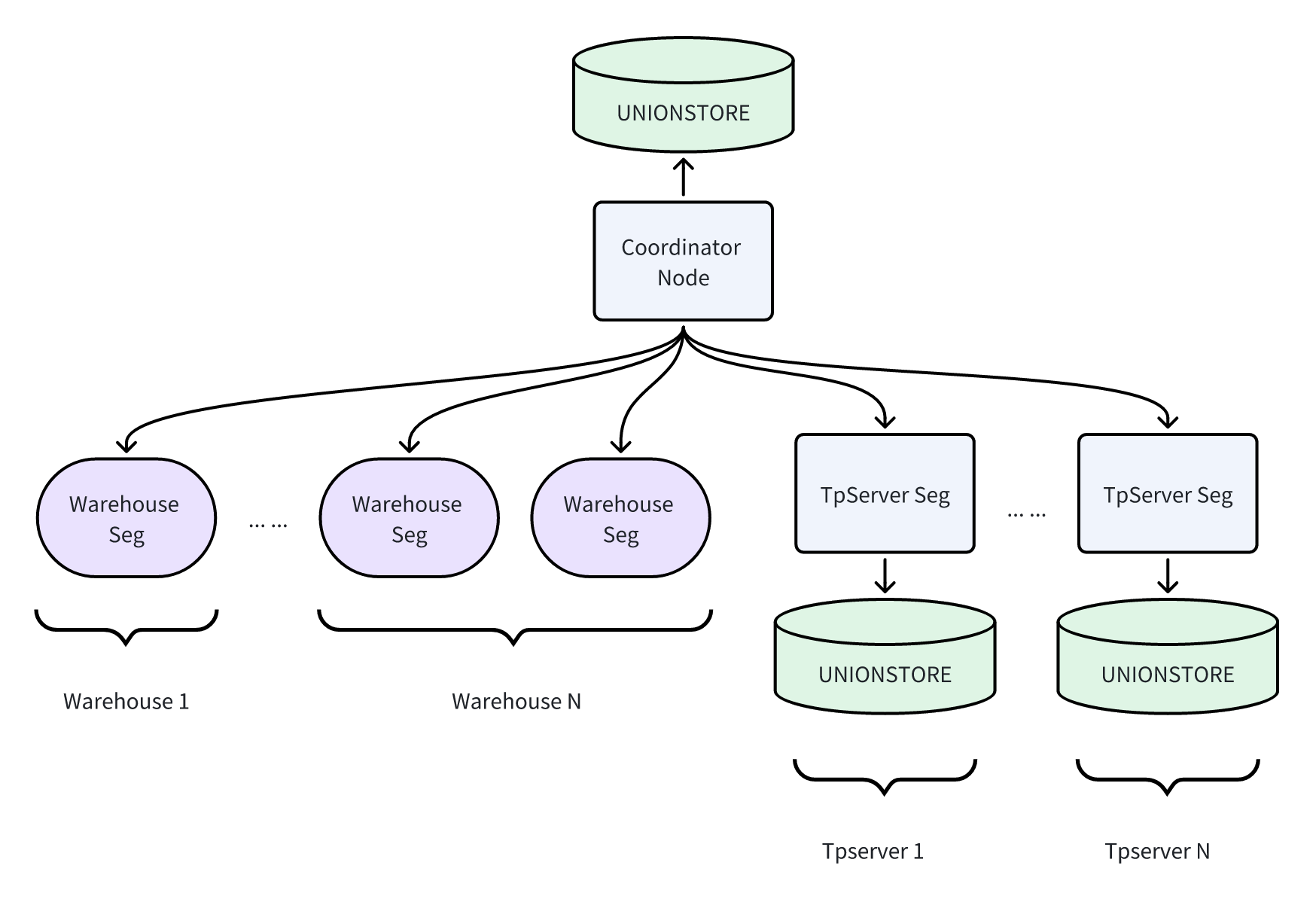
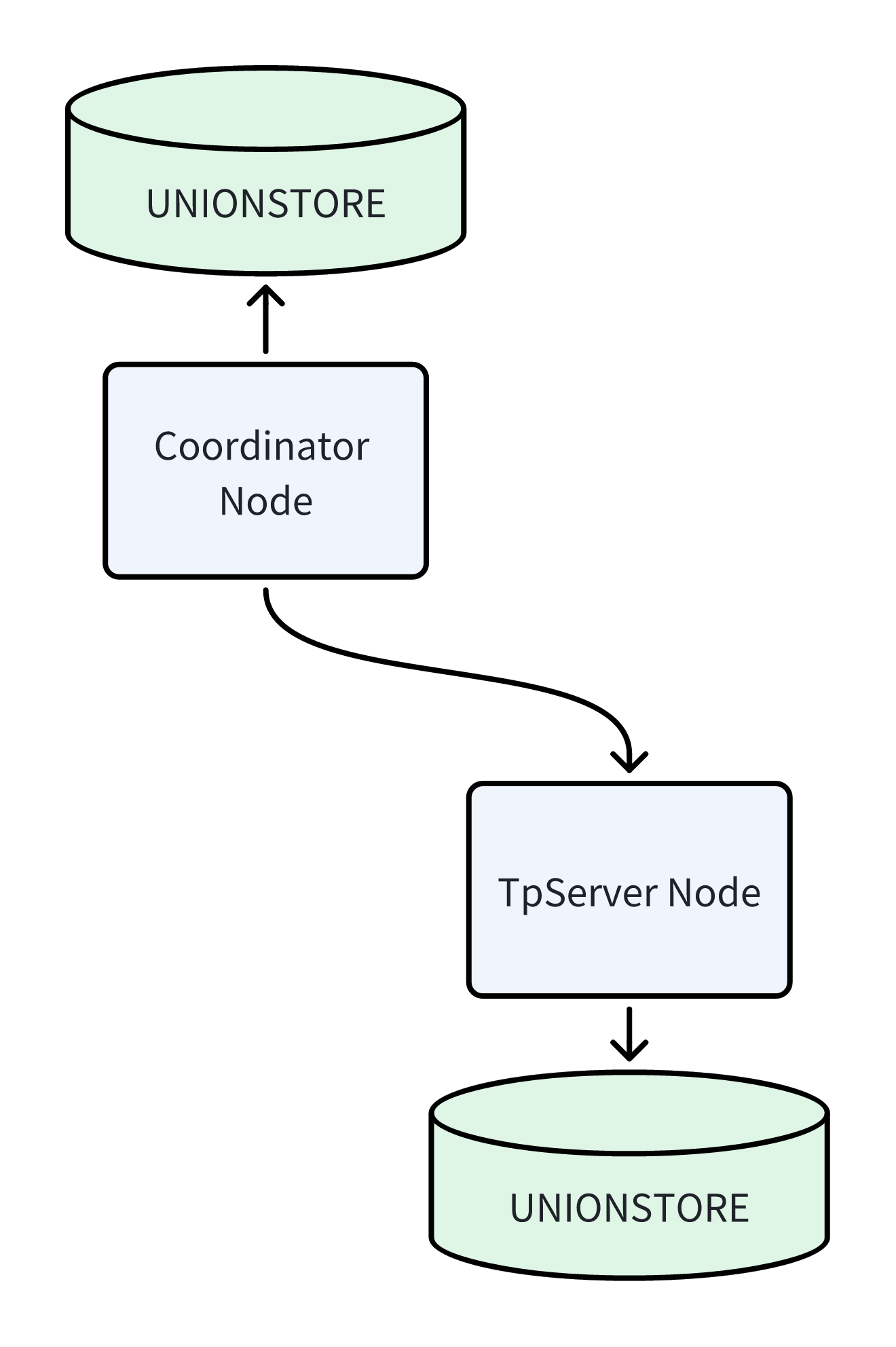
A typical cluster contains Coordinator nodes and TpServer nodes. They are logically independent, and both use the UnionStore architecture for underlying storage. Depending on deployment requirements, TpServer can share the same UnionStore cluster with the Coordinator (isolated through different tenants) or deploy an independent UnionStore service, enabling flexible isolation and scheduling of compute and storage resources.
Key Concepts
Hybrid Cluster Architecture: Your SynxDB Cloud cluster can simultaneously contain Warehouse Segments for analytical queries and TpServer Segments for transactional processing, coordinated by the Coordinator node. This architecture enables a single database system to handle both AP and TP workloads simultaneously.
Relation on TpServer (ROT): Any table created using the
CREATE TABLEstatement with theTPSERVERclause specified is called an ROT (Relation on TpServer) table. Data for such tables is physically stored on the specified TpServer node.Data Compatibility & Computation Offloading: To ensure TpServer can focus on high-concurrency transactional processing, the system follows the “computation offloading” principle when handling mixed workloads, intelligently moving computation pressure to stateless Warehouse nodes through data movement (Motion) strategies.
Read and Join Scenarios: The system introduces dedicated data distribution mechanisms. When queries require joining data from Warehouse Segments and TpServer, or performing complex computations, the optimizer prioritizes moving data from TpServer (ROT tables) to Warehouse Segments for computation under any condition that triggers data redistribution. This mechanism isolates analytical computation workloads, preventing them from affecting TpServer’s transactional processing stability.
Write (Insert) Scenarios: When complex computation results from Warehouse Segments need to be written to TpServer, computation tasks (such as Select/Project/Join) are completed on the Warehouse side, and the processed result data is sent to the target TpServer node through explicit Motion channels for final persistent writes.
Use Cases
High-Concurrency Transactional Processing (OLTP): Suitable for online business systems that require frequent point queries, insertions, and updates, such as order management systems and user centers.
Streaming Data Ingestion: Serves as a landing point for streaming data, efficiently receiving and storing real-time data from message queues such as Kafka, including IoT device data, user behavior logs, etc.
Hybrid Transactional/Analytical Processing (HTAP): Within the same database instance, use TpServer to handle high-frequency transactions from the frontend, while using Warehouse Segments to perform complex analysis and reporting queries on the full dataset (including data on TpServer).
Usage Methods
Manage TpServer Nodes
You can visually create and destroy TpServer nodes through the DBaaS Admin Console. Refer to Create TP Server.
Manage Permissions
Create/Delete Permissions: Administrators can grant or revoke permissions for users (roles) to create TpServer:
-- Grant permission
ALTER ROLE role_name CREATETS;

-- Revoke permission
ALTER ROLE role_name NOCREATETS;
Usage Permissions: Users (roles) can create and destroy TpServer nodes.
-- Grant permission
GRANT USAGE ON TPSERVER tpserver_name TO role_name;

-- Revoke permission
REVOKE USAGE ON TPSERVER tpserver_name FROM role_name;
Create ROT Tables
Use the TPSERVER clause in the CREATE TABLE statement to create a table on the specified TpServer.
CREATE TABLE my_tp_table (
    id INT,
    info TEXT,
    created_at TIMESTAMP
) TPSERVER tpserver_name;
You can also set the GUC cloud.default_tpserver so that the default storage table format is a heap table on the target TpServer, and then tables are created as heap tables on that TpServer by default without specifying the clause explicitly at the end of the statement, for example:
SET cloud.default_tpserver = tpserver_name;
Create directory tables on TpServer
In cloud-native deployments with the FDB catalog backend, you can also create directory tables on TpServer nodes. Append the TPSERVER clause to the CREATE DIRECTORY TABLE statement:
CREATE DIRECTORY TABLE <table_name> TABLESPACE <tablespace_name> TPSERVER tpserver_name;
If cloud.default_tpserver is set, directory tables automatically use the specified TpServer without the explicit TPSERVER clause. For more details on directory tables, see Directory Tables.
Access Data
You have two ways to access data on TpServer:
Method 1: Access through the Coordinator node (recommended). This is the standard usage method. You only need to connect to the Coordinator node to query or manipulate data on TpServer just like accessing regular tables.
Method 2: Direct client connection to TpServer. In certain specific scenarios, you can also use clients such as psql to directly connect to the TpServer process port. Especially for large batch data import scenarios, direct connection mode is recommended to reduce the load on the Coordinator node.
psql dbname -p [tpserver_port]
Note
Note: In direct connection mode, the system enforces strict operation restrictions. You are only allowed to execute query (
SELECT) and write (INSERT) operations on tables on that TpServer. Update (UPDATE) and delete (DELETE) operations must be executed through the Coordinator node.
Important Notes
Direct Connection Mode Limitations: When connecting directly to the TpServer port through a client, only
SELECTandINSERToperations are supported;UPDATEandDELETEare not supported. This ensures data consistency and optimizes streaming write performance. DDL operations must be executed through the Coordinator node.Mixed Query Performance: Cross-node
JOINqueries involving TpServer and Warehouse Segments will trigger data movement (Motion), which brings certain network and performance overhead. Be aware of this characteristic when designing applications.Permission Management: Creating and deleting TpServer are high-privilege operations. Ensure that only authorized users (roles) have the
CREATETSpermission. Deleting a TpServer requires the user to be the Owner of that node or have permissions for its associated role.Metadata Viewing: TpServer-related metadata is stored in system tables such as
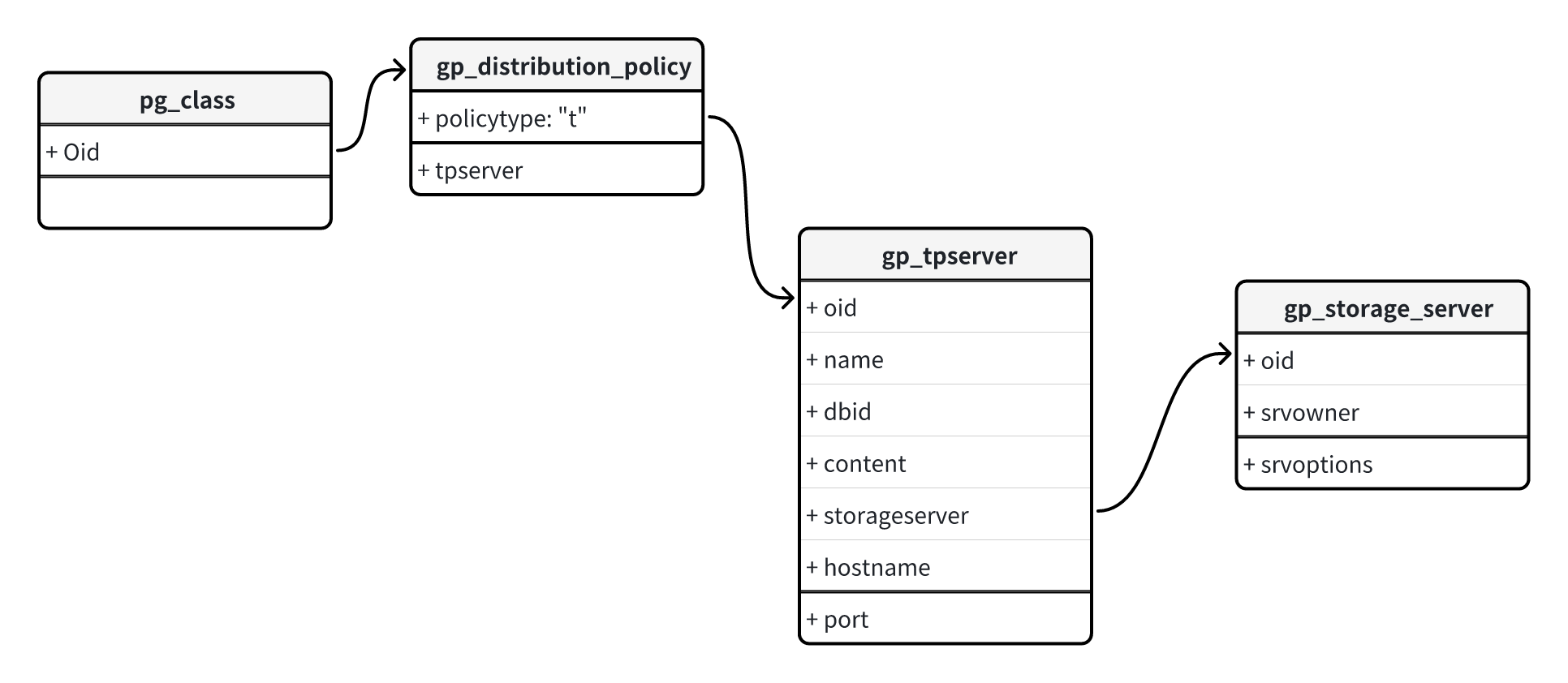
gp_tpserver,gp_distribution_policy, etc. Advanced users can query these tables to obtain detailed cluster configuration information.
Reference - Related System Tables
TpServer functionality stores metadata in system catalog tables, primarily involving the following system catalog tables:
gp_tpserver: This is the core dedicated catalog table for TpServer functionality, specifically used to store metadata for each TpServer node. It contains the node’soid, name (name), database ID (dbid), hostname (hostname), port (port), and related information for task dispatch. Entries in this table are associated with thegp_storage_servertable to define user ownership.gp_distribution_policy: This table is used to define data distribution policies, recording the association between table data and TpServer nodes. The table also includes the distribution typePOLICYTYPE_TPSERVERto identify that a table is defined on TpServer. The table also contains:Distribution type
POLICYTYPE_TPSERVER, used to identify that a table is defined on TpServer.A
tpservercolumn for storing the OID of the associated TpServer node.
gp_storage_server: A catalog table related to storage and external services. Used to manage user ownership (Owner) of TpServer nodes. Ownership information in thegp_tpservertable is directly associated with this table.pg_class: A core catalog table in PostgreSQL and Greenplum, storing information about all relations (such as tables, views, indexes). This table is the starting point for queries. A table’s OID (object identifier) is stored in this table. Through theOidinpg_class, you can associate with thegp_distribution_policytable to determine whether a table is an ROT table and which TpServer it is on.
The system table relationships are as follows: